Table of Contents
This file contains Unicode characters that might be confused with other characters. If you think that this is intentional, you can safely ignore this warning. Use the Escape button to reveal them.
The PortaPack is powered via the USB connector on the HackRF One. The connector type and battery support depend on the model:
| Model | USB connector | Internal battery |
|---|---|---|
| H1 | Micro-USB | No |
| H2 | Micro-USB | Optional LiPo |
| H4M | USB-C | Optional LiPo |
H1
The H1 has no internal battery and must be powered via USB at all times.
H2
The H2 can be fitted with an internal LiPo (Lithium Polymer) battery, charged via the Micro-USB port.
The maximum battery size that fits in a typical metal enclosure is 2500 mAh; 2100 mAh is a better fit. Based on testing, the H2/HackRF combination consumes between 250 mA (1.25 W) at the idle menu screen and 550 mA peak (2.75 W) with audio at full volume while receiving. When charging from USB with the device in use, peak current draw reaches approximately 1.5 A, dropping as charging progresses. The battery charges at a peak of ~1000 mA, settling to 600–700 mA, and takes 3–4 hours depending on battery capacity and cable quality — longer cables charge slower.
With a 2500 mAh battery, expect 4–5 hours of runtime depending on usage and battery condition.
H4M
The H4M uses a USB-C connector and has a dedicated power switch. It can also be fitted with an internal LiPo battery.
Note
Power consumption and charge time measurements for the H4M have not yet been documented here. Contributions welcome.
Battery charger modification (H2)
When connected to a computer or power bank, some H2 units generate interference and harmonic signals caused by the onboard battery charging circuit. This only occurs while the battery is charging, and not all units are affected.
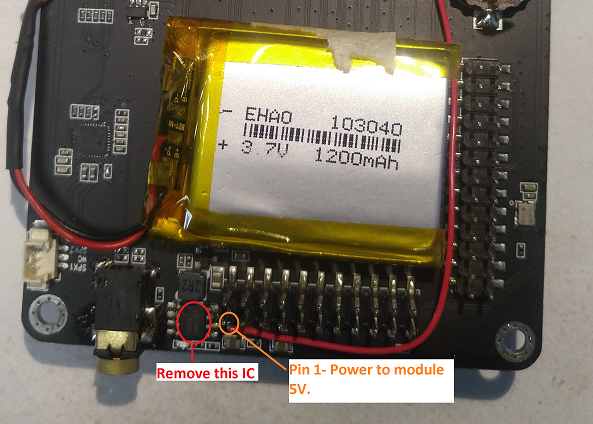
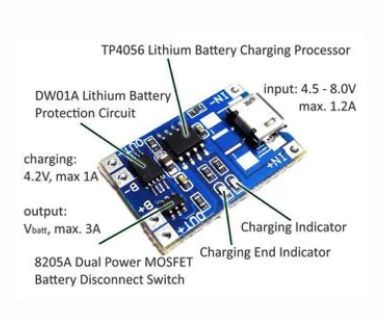
If you have confirmed the charging circuit is the source of the interference, one solution is to replace the charging IC with a TP4056 module. The TP4056 offers battery overcharge protection (4.2 V), discharge protection (2.9 V), and adjustable charge current (via a resistor on the module), and eliminates the interference seen with the original IC.
See the following pictures for more information, and take a look at the related issue
This file contains Unicode characters that might be confused with other characters. If you think that this is intentional, you can safely ignore this warning. Use the Escape button to reveal them.
Start here
Contributors
How to collaborate
Contributing Guidelines
How to ask questions correctly
Hardware
- PortaPack Versions (which one to buy)
- Features
- HackRF Versions
- Description of the hardware
- Enclosure/cases
- Repairs
- Mods
User manual
Intended use and Legality
- Usage cautions
- First steps
- Firmware update procedure
- User interface
- Powering the PortaPack
- Troubleshooting
- Won't boot
- Config Menu
- Firmware upgrade
- Diagnose firmware update in Windows
- Receive Quality Issues
- No TX/RX
- TX Carrier Only
- H2+ speaker modifications
- Dead Coin Cell Battery
- Factory Defaults
- SD card not recognized by PC with the SD-card over USB selected
- DFU overlay
- Full reset
- SolveBoard
- How to Format SDCard
- What if I don't like some of the apps
Applications
- 📥 Receivers
- 📤 Transmitters
- ADS-B(S) TX
- Adult Toys
- APRS TX
- BHT Xy/EP
- BLE TX
- BLESpam
- Burger Pager
- CVS Spam
- EPIRB
- FlipperTX
- GPS Sim
- Hopper
- Jammer
- KeeLoq TX
- Key fob TX
- LGE Tool
- MDC-1200 TX
- Morse TX
- OOK
- OOK Brute
- OOK Editor
- P25 TX
- POCSAG TX
- RDS
- RTTY TX
- SAME TX
- Signal gen
- Soundboard
- Spectrum Painter
- SSTV
- TEDI/LCR
- TouchTunes
- TPMS TX
- 🔄 Transceivers
- 🟡 Recon
- 🔴 Capture
- ▶️ Replay
- 🖲️ Remote
- 🔍 Looking Glass
- 🛠️ Utilities
- 🎮 Games
- ⚙️ Settings
- 💻 HackRF Mode
Misc
Developer Manual
- Compilation of the firmware
- Compile on WSL with ninja
- How to compile on Windows faster with WSL 2
- Using Docker and Kitematic
- Docker command-line reference
- Using Buddyworks and other CI platforms
- Notes for Buddy.Works (and other CI platforms)
- Using ARM on Debian host
- All in one script for ARM on Debian host
- Compile on Arch based distro (exclude Asahi), or other weird distros
- Dev build versions
- Notes About ccache
- Create a custom map
- Code formatting
- PR process
- Description of the Structure
- Software Dev Guides
- Tools
- Research
- UI Screenshots
- Maintaining
- Creating a prod/stable release (Maintainers only)
- Maintaining rules
- Development States Notes
This file contains Unicode characters that might be confused with other characters. If you think that this is intentional, you can safely ignore this warning. Use the Escape button to reveal them.
Note
The wiki is incomplete. Please add content and collaborate.
Important
- This is a public wiki. Everything is visible to everyone. Don't use it for personal notes.
- Avoid linking to external tutorials/articles; they may become outdated or contain false information.